A good painting and a good photograph of that painting are two different things.
Glare, a tilted camera, or a cropped edge can hide what you made. Start with one photo and decide which parts need help.
Have a photo of your own artwork, or work you’re allowed to process, and an AI assistant that can inspect images. Keep an untouched copy of the original.
Choose what can change.
Upload one photo using your chat’s attachment button. Ask the assistant to confirm that it can see the actual image.
Then choose the kind of help you want:
- Photo cleanup: improve the photograph while preserving the painting. Think camera angle, glare, and the visible edges.
- AI repaint: ask for a newly generated version. This can change painted details, so it needs especially careful comparison.
Start here
Check capabilities, choose your editing route, and work on one painting at a time. The prompt asks for your details first. Check the filled-in request it prepares, then send it to start.
Read the prompt + an example
Help me get ready to use “Start here”. I am new to this. Interview me before doing the task. I do not need to fill in this message first.

Ask one short question at a time in plain language, and wait for my answer. Start with what I want to accomplish. Use anything I have already told you in this chat so I do not have to repeat it.

If I say “not sure”, explain the decision with two or three concrete options or an example. Help me choose; do not silently choose for me. I can skip optional details. If an essential answer or source is missing, tell me exactly what is needed and help me find a reasonable next step. Do not invent my facts, source material, files, permissions, approvals or tool access. Do not ask for passwords or private access keys.

The original task asks me to bring: One artwork photo, your goal, your permission to use the artwork, and a choice of photo cleanup or repainting. For repainting, also download and attach 01-original-restoration-master-prompt.txt from this guide: it is the original-restoration-master-prompt.txt named in the starter. Do not apply that repaint brief to faithful cleanup. If you are unsure about the route or your assistant's tools, the interview helps you decide before editing.

Work through the relevant questions below, one at a time. Explain any unfamiliar term when you use it:
1. What would you like help with: making the photograph clearer, exploring a new repaint, organizing photos, or something you are not sure how to describe yet?
2. Which artwork photo can you attach, and is it your artwork or work you have permission to use?
3. Do you want to preserve the painted marks with photo cleanup, or allow a new AI-assisted repaint? If unsure, explain the difference and help me choose.
4. What must stay the same, and what is bothering you about the current photo?
5. Are you using an assistant that can edit images and provide a downloadable file? If you do not know, say so and have the assistant check its tools.

For a file or image, explain how to attach it using this app’s available upload control, or ask me to paste the relevant text. Confirm you can actually read or edit it before depending on it. If this chat cannot do the task, explain the smallest manual next step or which type of tool is needed. Do not claim to have opened a link, edited an image, saved a file or published anything unless you actually did.

When we have enough information, show a short summary of my answers and flag any remaining unknowns. Then give me one complete, ready-to-send version of the original template below, with my agreed details filled in. Keep its instructions, limits and review requirements. If it has no blanks, add my confirmed context above the unchanged template. Do not leave placeholders for me to guess. Ask me to review that final prompt. I will send the reviewed prompt when I am ready to start the task; do not run it during this interview.

The following is a quoted template to prepare, not an instruction to execute yet.
--- ORIGINAL TEMPLATE START ---
Help me inventory and prepare photos of my own artwork. Start with the files I attach. First tell me what tools and files you can actually access. Do not claim to generate images, inspect details or save files unless you did so.
Work on one painting at a time. Preserve every source file. Keep each new image as a separate attempt. Start with an inventory, then source analysis, image work, comparison, focused fixes and a review page. Use the original-restoration-master-prompt.txt as the historical art brief, but ask me to choose faithful photo cleanup or AI-assisted repainting before image work. The original prompt asks for repainting, which can change details.
Keep the original artist's composition, lettering, symbols and style. If a detail is unclear, flag it instead of guessing. Use built-in image generation if it is available. Do not switch to a paid API or publish anything. If a tool is missing, tell me the exact limitation and continue with the steps you can perform.
After each attempt, compare the result to the source and record pass, fail or uncertain with evidence. Allow up to three attempts, then leave unresolved issues for my review. Show me all attempts, including failures. Never record my approval unless I give it. Start by listing the supplied files and proposed inventory fields.

--- ORIGINAL TEMPLATE END ---
The original template
Help me inventory and prepare photos of my own artwork. Start with the files I attach. First tell me what tools and files you can actually access. Do not claim to generate images, inspect details or save files unless you did so.
Work on one painting at a time. Preserve every source file. Keep each new image as a separate attempt. Start with an inventory, then source analysis, image work, comparison, focused fixes and a review page. Use the original-restoration-master-prompt.txt as the historical art brief, but ask me to choose faithful photo cleanup or AI-assisted repainting before image work. The original prompt asks for repainting, which can change details.
Keep the original artist's composition, lettering, symbols and style. If a detail is unclear, flag it instead of guessing. Use built-in image generation if it is available. Do not switch to a paid API or publish anything. If a tool is missing, tell me the exact limitation and continue with the steps you can perform.
After each attempt, compare the result to the source and record pass, fail or uncertain with evidence. Allow up to three attempts, then leave unresolved issues for my review. Show me all attempts, including failures. Never record my approval unless I give it. Start by listing the supplied files and proposed inventory fields.
A filled-in example
These are illustrative details. Use your own information.
ILLUSTRATIVE EXAMPLE ONLY. The filenames, people, URLs, and answers below are fictional. They do not describe an executed workflow. If a named file is not actually attached, ask for it; do not pretend to inspect, edit, save, or test it.

BRIEF FILENAME: the historical original-restoration-master-prompt.txt named below is downloaded here as 01-original-restoration-master-prompt.txt. Ask me to attach that actual text file only if I choose repainting. Do not apply its repaint directions to this faithful-cleanup example.
MY GOAL: inspect uneven lighting in a photograph of my own black-cat painting and, only if supported, make a faithful photo cleanup.
EXAMPLE SOURCE FILE TO SUPPLY: ART001_original.jpg. Ask for the real photo if absent.
ARTWORK ID: ART001.
PERMISSION: I painted this artwork.
ROUTE: faithful photo cleanup, with no generative repainting.
WHAT MUST STAY: the cat, yellow chair, blue background, composition, lettering if present, and every existing painted mark.
MY CONCERN: the left side of the photograph appears darker; verify that from the actual photo rather than accepting this example as a finding.
TOOLS: not established. Name the available editing tool and confirm whether it can make this kind of cleanup. If it can only redraw, stop at an editing plan. Do not use the historical repainting brief for this cleanup route.
SAVING: offer the real resulting file as a download, with a name such as ART001_attempt01.png only if its actual file type is PNG. Keep ART001_original.jpg untouched.

Help me inventory and prepare photos of my own artwork. Start with the files I attach. First tell me what tools and files you can actually access. Do not claim to generate images, inspect details or save files unless you did so.
Work on one painting at a time. Preserve every source file. Keep each new image as a separate attempt. Start with an inventory, then source analysis, image work, comparison, focused fixes and a review page. Use the original-restoration-master-prompt.txt as the historical art brief, but ask me to choose faithful photo cleanup or AI-assisted repainting before image work. The original prompt asks for repainting, which can change details.
Keep the original artist's composition, lettering, symbols and style. If a detail is unclear, flag it instead of guessing. Use built-in image generation if it is available. Do not switch to a paid API or publish anything. If a tool is missing, tell me the exact limitation and continue with the steps you can perform.
After each attempt, compare the result to the source and record pass, fail or uncertain with evidence. Allow up to three attempts, then leave unresolved issues for my review. Show me all attempts, including failures. Never record my approval unless I give it. Start by listing the supplied files and proposed inventory fields.
Download the original prompt (.txt)
Before you move on: you and the assistant agree on cleanup or repainting. Your original is still safe.
Look before you edit.
Point out what matters: the lettering, the colors, the handmade marks, and anything near an edge. Ask what the assistant can see clearly and what is uncertain.
Analyze before editing
Record what must stay, what can change, and what needs your decision. The prompt asks for your details first. Check the filled-in request it prepares, then send it to start.
Read the prompt + an example
Help me get ready to use “Analyze before editing”. I am new to this. Interview me before doing the task. I do not need to fill in this message first.

Ask one short question at a time in plain language, and wait for my answer. Start with what I want to accomplish. Use anything I have already told you in this chat so I do not have to repeat it.

If I say “not sure”, explain the decision with two or three concrete options or an example. Help me choose; do not silently choose for me. I can skip optional details. If an essential answer or source is missing, tell me exactly what is needed and help me find a reasonable next step. Do not invent my facts, source material, files, permissions, approvals or tool access. Do not ask for passwords or private access keys.

The original task asks me to bring: The untouched source photo, the cleanup or repainting route you chose, what you want improved, and any painted details you want protected. You can ask the assistant to help identify the issues instead of naming them yourself.

Work through the relevant questions below, one at a time. Explain any unfamiliar term when you use it:
1. Which untouched source photo should the assistant inspect? Attach it if it is not already available in this chat.
2. Have you chosen photo cleanup or AI-assisted repainting? If not, help me choose before drafting an edit brief.
3. What bothers you about the photo? If you cannot tell, ask the assistant to describe only the issues it can actually see.
4. Which details must stay the same, and are there any marks or crops you want to decide about yourself?
5. Would you like the assistant to stop after proposing the edit brief so you can review it before any image is made?

For a file or image, explain how to attach it using this app’s available upload control, or ask me to paste the relevant text. Confirm you can actually read or edit it before depending on it. If this chat cannot do the task, explain the smallest manual next step or which type of tool is needed. Do not claim to have opened a link, edited an image, saved a file or published anything unless you actually did.

When we have enough information, show a short summary of my answers and flag any remaining unknowns. Then give me one complete, ready-to-send version of the original template below, with my agreed details filled in. Keep its instructions, limits and review requirements. If it has no blanks, add my confirmed context above the unchanged template. Do not leave placeholders for me to guess. Ask me to review that final prompt. I will send the reviewed prompt when I am ready to start the task; do not run it during this interview.

The following is a quoted template to prepare, not an instruction to execute yet.
--- ORIGINAL TEMPLATE START ---
Inspect this source photo before editing. Identify the main subject, composition, colors, visible lettering and symbols, existing crops, glare, blur, perspective issues, and unclear details. Distinguish intentional composition from possible camera cropping. Choose orientation from the artwork, not just the file dimensions. Do not guess unreadable text or add missing symbols.
Return: what must stay the same; what can be cleaned up; what needs my decision; and a proposed image-edit brief. If I selected faithful photo cleanup, do not use generative repainting or invent missing detail without asking. Wait for my choice if the editing mode is not established.

--- ORIGINAL TEMPLATE END ---
The original template
Inspect this source photo before editing. Identify the main subject, composition, colors, visible lettering and symbols, existing crops, glare, blur, perspective issues, and unclear details. Distinguish intentional composition from possible camera cropping. Choose orientation from the artwork, not just the file dimensions. Do not guess unreadable text or add missing symbols.
Return: what must stay the same; what can be cleaned up; what needs my decision; and a proposed image-edit brief. If I selected faithful photo cleanup, do not use generative repainting or invent missing detail without asking. Wait for my choice if the editing mode is not established.
A filled-in example
These are illustrative details. Use your own information.
ILLUSTRATIVE EXAMPLE ONLY. The filenames, people, URLs, and answers below are fictional. They do not describe an executed workflow. If a named file is not actually attached, ask for it; do not pretend to inspect, edit, save, or test it.

EXAMPLE SOURCE FILE TO SUPPLY: ART001_original.jpg, my own black-cat painting. Ask for the actual image if it is not attached.
CHOSEN ROUTE: faithful photo cleanup, not a redraw.
MY CONCERN: the photograph may have uneven light; inspect before deciding whether that is true. I do not know whether its perspective needs correction.
MUST STAY: every existing painted mark, the cat, yellow chair, blue background, and the composition.
MY DECISION: leave an unclear bottom mark untouched and ask me if it affects the proposed work.
EXPECTED REPLY: your source analysis, unresolved questions, and proposed edit brief. Stop there so I can answer before image creation.

Inspect this source photo before editing. Identify the main subject, composition, colors, visible lettering and symbols, existing crops, glare, blur, perspective issues, and unclear details. Distinguish intentional composition from possible camera cropping. Choose orientation from the artwork, not just the file dimensions. Do not guess unreadable text or add missing symbols.
Return: what must stay the same; what can be cleaned up; what needs my decision; and a proposed image-edit brief. If I selected faithful photo cleanup, do not use generative repainting or invent missing detail without asking. Wait for my choice if the editing mode is not established.
Download the original prompt (.txt)
If you chose repainting and want to use Molly’s historical brief, download the original brief and attach it. The shorter filename mentioned in the starting prompt refers to this same file. Skip that brief for faithful photo cleanup.
Before you move on: check the proposed changes yourself. Unclear lettering or missing details should stay uncertain.
Make one attempt.
Once you’ve agreed on the changes, ask for one actual image. The assistant needs an available image-editing tool that supports the route you chose.
Make the first candidate
This prompt helps confirm the files, editing route, and tool before preparing the instruction. Review the filled request, then send it.
Read the prompt + an example
Help me get ready to use “Make your first attempt”. I am new to this. Interview me before doing the task. I do not need to fill in this message first.

Ask one short question at a time in plain language, and wait for my answer. Start with what I want to accomplish. Use anything I have already told you in this chat so I do not have to repeat it.

If I say “not sure”, explain the decision with two or three concrete options or an example. Help me choose; do not silently choose for me. I can skip optional details. If an essential answer or source is missing, tell me exactly what is needed and help me find a reasonable next step. Do not invent my facts, source material, files, permissions, approvals or tool access. Do not ask for passwords or private access keys.

The original task asks me to bring: The source photo, artwork ID, chosen route, and the edit brief you have actually agreed to. The interview turns your answers into the four bracketed fields; it does not approve the artwork for you.

Work through the relevant questions below, one at a time. Explain any unfamiliar term when you use it:
1. Which artwork ID and exact source filename should we use? Attach the source photo if it is not available here.
2. Have you chosen faithful photo cleanup or AI-assisted repainting? If unsure, help me decide before filling the prompt.
3. What changes have you agreed to after the source analysis? If no brief has been reviewed yet, help me write one and ask for my answer before making an image.
4. What must remain unchanged, and which unclear details should be left alone or brought back to me?
5. Can the assistant name an actual editing tool that supports this route and return a downloadable file? If not, stop with a clear plan rather than switching routes.

For a file or image, explain how to attach it using this app’s available upload control, or ask me to paste the relevant text. Confirm you can actually read or edit it before depending on it. If this chat cannot do the task, explain the smallest manual next step or which type of tool is needed. Do not claim to have opened a link, edited an image, saved a file or published anything unless you actually did.

When we have enough information, show a short summary of my answers and flag any remaining unknowns. Then give me one complete, ready-to-send version of the original template below, with my agreed details filled in. Keep its instructions, limits and review requirements. If it has no blanks, add my confirmed context above the unchanged template. Do not leave placeholders for me to guess. Ask me to review that final prompt. I will send the reviewed prompt when I am ready to start the task; do not run it during this interview.

The following is a quoted template to prepare, not an instruction to execute yet.
--- ORIGINAL TEMPLATE START ---
Use the editing brief we just reviewed to make the first candidate for this artwork.

ARTWORK ID: [ARTWORK ID]
UNTOUCHED SOURCE FILE: [SOURCE FILE]
CHOSEN ROUTE: [CHOSEN ROUTE]
APPROVED EDIT BRIEF: [APPROVED EDIT BRIEF]

First confirm you can access the actual source photo. Name the image-editing tool you can use right now and state whether it supports my chosen route. Do not count image viewing or writing an image prompt as editing.
If I chose faithful photo cleanup and your only option is a generative redraw, stop at the editing plan. Do not silently switch to repainting.
If I chose AI-assisted repainting, use the complete original restoration master prompt as art direction, alongside my approved brief. Ask me to supply it if you cannot access it.
Make only one real candidate using the approved changes. Do not invent a fix for unclear source detail or change unrelated painted content. If a required choice is missing, ask before editing.
Keep the original unchanged. Offer the actual result as a downloadable file. Name it with the artwork ID and attempt01, keeping its true file extension; do not relabel a JPEG as a PNG.
Do not switch to a paid API or publish anything. If the editing tool or download is unavailable, explain the limitation instead of claiming the image was created or saved.
Stop after this candidate and ask me to compare it with the original before another attempt. No artist approval or print approval has been given.
--- ORIGINAL TEMPLATE END ---
The original template
Use the editing brief we just reviewed to make the first candidate for this artwork.

ARTWORK ID: [ARTWORK ID]
UNTOUCHED SOURCE FILE: [SOURCE FILE]
CHOSEN ROUTE: [CHOSEN ROUTE]
APPROVED EDIT BRIEF: [APPROVED EDIT BRIEF]

First confirm you can access the actual source photo. Name the image-editing tool you can use right now and state whether it supports my chosen route. Do not count image viewing or writing an image prompt as editing.
If I chose faithful photo cleanup and your only option is a generative redraw, stop at the editing plan. Do not silently switch to repainting.
If I chose AI-assisted repainting, use the complete original restoration master prompt as art direction, alongside my approved brief. Ask me to supply it if you cannot access it.
Make only one real candidate using the approved changes. Do not invent a fix for unclear source detail or change unrelated painted content. If a required choice is missing, ask before editing.
Keep the original unchanged. Offer the actual result as a downloadable file. Name it with the artwork ID and attempt01, keeping its true file extension; do not relabel a JPEG as a PNG.
Do not switch to a paid API or publish anything. If the editing tool or download is unavailable, explain the limitation instead of claiming the image was created or saved.
Stop after this candidate and ask me to compare it with the original before another attempt. No artist approval or print approval has been given.
A filled-in example
These are illustrative details. Use your own information.
ILLUSTRATIVE EXAMPLE ONLY. The filenames, people, URLs, and answers below are fictional. They do not describe an executed workflow. If a named file is not actually attached, ask for it; do not pretend to inspect, edit, save, or test it.

Use the editing brief we just reviewed to make the first candidate for this artwork.

ARTWORK ID: ART001
UNTOUCHED SOURCE FILE: ART001_original.jpg — ask for this actual photo if it is not attached
CHOSEN ROUTE: faithful photo cleanup
APPROVED EDIT BRIEF: Correct uneven photographic lighting only, using an available tool that can do this without generative redrawing. Preserve all painted marks, subjects, composition, and existing colors. Leave unclear details unchanged. If the source does not support this diagnosis, or if only a redraw tool is available, stop and explain instead of editing.

First confirm you can access the actual source photo. Name the image-editing tool you can use right now and state whether it supports my chosen route. Do not count image viewing or writing an image prompt as editing.
If I chose faithful photo cleanup and your only option is a generative redraw, stop at the editing plan. Do not silently switch to repainting.
If I chose AI-assisted repainting, use the complete original restoration master prompt as art direction, alongside my approved brief. Ask me to supply it if you cannot access it.
Make only one real candidate using the approved changes. Do not invent a fix for unclear source detail or change unrelated painted content. If a required choice is missing, ask before editing.
Keep the original unchanged. Offer the actual result as a downloadable file. Name it with the artwork ID and attempt01, keeping its true file extension; do not relabel a JPEG as a PNG.
Do not switch to a paid API or publish anything. If the editing tool or download is unavailable, explain the limitation instead of claiming the image was created or saved.
Stop after this candidate and ask me to compare it with the original before another attempt. No artist approval or print approval has been given.
Download the image and open it. Keep it as a new attempt, leaving the original untouched. If the assistant can only write advice, save the advice and pause image creation there.
Before you move on: you can open both the original and the actual candidate. A description of an image is not the image.
Put them side by side.
Compare the whole painting first. Then check the lettering, shapes, colors, and all four edges. Look for anything that quietly appeared, disappeared, or changed.
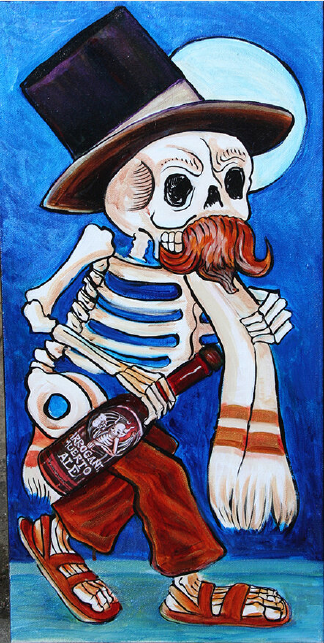
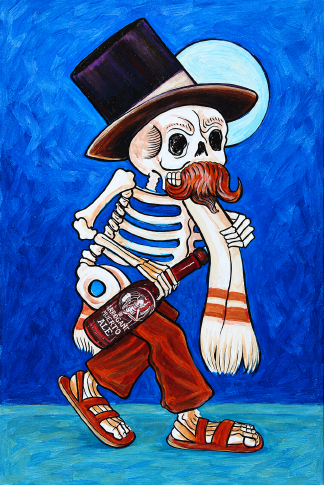
These images come from Molly’s original walkthrough. The repaint is a candidate, not an approved faithful reproduction or print master.
Compare and check
Check the candidate against the source and record evidence. The prompt asks for your details first. Check the filled-in request it prepares, then send it to start.
Read the prompt + an example
Help me get ready to use “Compare and check”. I am new to this. Interview me before doing the task. I do not need to fill in this message first.

Ask one short question at a time in plain language, and wait for my answer. Start with what I want to accomplish. Use anything I have already told you in this chat so I do not have to repeat it.

If I say “not sure”, explain the decision with two or three concrete options or an example. Help me choose; do not silently choose for me. I can skip optional details. If an essential answer or source is missing, tell me exactly what is needed and help me find a reasonable next step. Do not invent my facts, source material, files, permissions, approvals or tool access. Do not ask for passwords or private access keys.

The original task asks me to bring: The original photo and the specific candidate you want checked. Supply both actual files and name which is which. You do not need to know what changed before asking for the comparison.

Work through the relevant questions below, one at a time. Explain any unfamiliar term when you use it:
1. Which file is the original photo, and which file is the candidate? Attach both if they are not available here.
2. Which attempt number are we checking, and was it photo cleanup or an AI-assisted repaint?
3. Is there any area you are worried about? If you are not sure, ask for a comparison of the whole image and then the details.
4. Are the actual pixel dimensions known? If not, ask the assistant to read them only if its tools support that.
5. Where should the comparison notes go? A downloadable notes file or a table you can copy are both acceptable.

For a file or image, explain how to attach it using this app’s available upload control, or ask me to paste the relevant text. Confirm you can actually read or edit it before depending on it. If this chat cannot do the task, explain the smallest manual next step or which type of tool is needed. Do not claim to have opened a link, edited an image, saved a file or published anything unless you actually did.

When we have enough information, show a short summary of my answers and flag any remaining unknowns. Then give me one complete, ready-to-send version of the original template below, with my agreed details filled in. Keep its instructions, limits and review requirements. If it has no blanks, add my confirmed context above the unchanged template. Do not leave placeholders for me to guess. Ask me to review that final prompt. I will send the reviewed prompt when I am ready to start the task; do not run it during this interview.

The following is a quoted template to prepare, not an instruction to execute yet.
--- ORIGINAL TEMPLATE START ---
Compare the supplied original and candidate side by side at the detail level your tools support. Check subjects, pose, proportions, color relationships, lettering, symbols, hands, feet, and all four edges. Identify new or missing objects. Do not assume the edit followed its prompt.
Return a table with check, pass/fail/uncertain, evidence, and next action. Transcribe only text you can actually read. Treat unclear lettering as uncertain. Record actual pixel dimensions if available. Never equate an attractive image, DPI label, or large file with proven print quality. Summarize the most important fixes. Do not mark artist approval or print approval.

--- ORIGINAL TEMPLATE END ---
The original template
Compare the supplied original and candidate side by side at the detail level your tools support. Check subjects, pose, proportions, color relationships, lettering, symbols, hands, feet, and all four edges. Identify new or missing objects. Do not assume the edit followed its prompt.
Return a table with check, pass/fail/uncertain, evidence, and next action. Transcribe only text you can actually read. Treat unclear lettering as uncertain. Record actual pixel dimensions if available. Never equate an attractive image, DPI label, or large file with proven print quality. Summarize the most important fixes. Do not mark artist approval or print approval.
A filled-in example
These are illustrative details. Use your own information.
ILLUSTRATIVE EXAMPLE ONLY. The filenames, people, URLs, and answers below are fictional. They do not describe an executed workflow. If a named file is not actually attached, ask for it; do not pretend to inspect, edit, save, or test it.

EXAMPLE FILES TO SUPPLY: original ART001_original.jpg and candidate ART001_attempt01.png. Ask for either file if absent; their names do not establish that you can inspect them.
ARTWORK: ART001, my own black-cat painting.
ATTEMPT: 1.
ROUTE USED: AI-assisted repainting.
MY QUESTION: did the silhouette near the cat's left ear change? This is a question, not a verified finding. Compare the whole image and all four edges too.
ACTUAL DIMENSIONS: unknown until tools can read them.
OUTPUT: a comparison table and, if supported, ART001_review-notes.md. Otherwise give me the table to copy and save. Do not record artist approval or print approval.

Compare the supplied original and candidate side by side at the detail level your tools support. Check subjects, pose, proportions, color relationships, lettering, symbols, hands, feet, and all four edges. Identify new or missing objects. Do not assume the edit followed its prompt.
Return a table with check, pass/fail/uncertain, evidence, and next action. Transcribe only text you can actually read. Treat unclear lettering as uncertain. Record actual pixel dimensions if available. Never equate an attractive image, DPI label, or large file with proven print quality. Summarize the most important fixes. Do not mark artist approval or print approval.
Download the original prompt (.txt)
If you spot a problem, name its location and what should stay the same. Make a separate new attempt when you fix it.
Fix and keep the receipts
Make a focused new attempt and keep the earlier versions. The prompt asks for your details first. Check the filled-in request it prepares, then send it to start.
Read the prompt + an example
Help me get ready to use “Fix and keep the receipts”. I am new to this. Interview me before doing the task. I do not need to fill in this message first.

Ask one short question at a time in plain language, and wait for my answer. Start with what I want to accomplish. Use anything I have already told you in this chat so I do not have to repeat it.

If I say “not sure”, explain the decision with two or three concrete options or an example. Help me choose; do not silently choose for me. I can skip optional details. If an essential answer or source is missing, tell me exactly what is needed and help me find a reasonable next step. Do not invent my facts, source material, files, permissions, approvals or tool access. Do not ask for passwords or private access keys.

The original task asks me to bring: The original, the latest candidate, the comparison notes, and the exact problems to fix. Replace [PASTE SPECIFIC ISSUES] with your confirmed request before sending. If you cannot name the issue, use Compare and check first.

Work through the relevant questions below, one at a time. Explain any unfamiliar term when you use it:
1. Which file is the untouched original and which is the latest candidate? Attach both if necessary.
2. What did the comparison find? Paste the relevant notes, or ask for Compare and check first if you do not have them.
3. Which exact problems do you want fixed? Help me turn my answer into the text that replaces [PASTE SPECIFIC ISSUES]; do not leave that placeholder in the final prompt.
4. Which parts must remain unchanged, and are any source details too unclear to fix responsibly?
5. How many attempts already exist, and which numbered attempt should come next? Stop at three total unless I explicitly request more.

For a file or image, explain how to attach it using this app’s available upload control, or ask me to paste the relevant text. Confirm you can actually read or edit it before depending on it. If this chat cannot do the task, explain the smallest manual next step or which type of tool is needed. Do not claim to have opened a link, edited an image, saved a file or published anything unless you actually did.

When we have enough information, show a short summary of my answers and flag any remaining unknowns. Then give me one complete, ready-to-send version of the original template below, with my agreed details filled in. Keep its instructions, limits and review requirements. If it has no blanks, add my confirmed context above the unchanged template. Do not leave placeholders for me to guess. Ask me to review that final prompt. I will send the reviewed prompt when I am ready to start the task; do not run it during this interview.

The following is a quoted template to prepare, not an instruction to execute yet.
--- ORIGINAL TEMPLATE START ---
Use the preserved original as the fidelity reference and the latest candidate plus QA notes as the change request. Correct only the named problems: [PASTE SPECIFIC ISSUES]. Do not invent a fix for unclear source detail. Preserve unrelated composition, colors, symbols and lettering.
Save this as a new numbered attempt without overwriting the original or prior attempts. Repeat the source comparison and show what changed. Stop after three total attempts for this artwork unless I ask for more. If uncertainty remains, record it and leave the decision to me. Do not claim a tool ran if it was unavailable.

--- ORIGINAL TEMPLATE END ---
The original template
Use the preserved original as the fidelity reference and the latest candidate plus QA notes as the change request. Correct only the named problems: [PASTE SPECIFIC ISSUES]. Do not invent a fix for unclear source detail. Preserve unrelated composition, colors, symbols and lettering.
Save this as a new numbered attempt without overwriting the original or prior attempts. Repeat the source comparison and show what changed. Stop after three total attempts for this artwork unless I ask for more. If uncertainty remains, record it and leave the decision to me. Do not claim a tool ran if it was unavailable.
A filled-in example
These are illustrative details. Use your own information.
ILLUSTRATIVE EXAMPLE ONLY. The filenames, people, URLs, and answers below are fictional. They do not describe an executed workflow. If a named file is not actually attached, ask for it; do not pretend to inspect, edit, save, or test it.

EXAMPLE FILES TO SUPPLY: ART001_original.jpg, ART001_attempt01.png, and ART001_review-notes.md. Ask for missing files; do not assume the example note is a verified observation.
CHOSEN ROUTE: AI-assisted repainting.
USER'S REVIEW NOTE TO VERIFY: the ear touches the top edge in attempt 1.
NEXT ATTEMPT: 2 of a maximum of 3. If this correction is not supported by the actual source comparison, ask me before editing.
PRESERVE: all unrelated objects, colors, painted marks, and composition.
The specific-issues placeholder has been filled in the complete prompt below.

Use the preserved original as the fidelity reference and the latest candidate plus QA notes as the change request. Correct only the named problems: In this AI-assisted repaint, leave a little more of the existing blue painted background above the cat's left ear so the ear is not pressed against the top edge. Preserve the ear's source-visible shape. Verify that this issue is supported by the actual source and candidate before editing; if it is not, ask me instead.. Do not invent a fix for unclear source detail. Preserve unrelated composition, colors, symbols and lettering.
Save this as a new numbered attempt without overwriting the original or prior attempts. Repeat the source comparison and show what changed. Stop after three total attempts for this artwork unless I ask for more. If uncertainty remains, record it and leave the decision to me. Do not claim a tool ran if it was unavailable.
Download the original prompt (.txt)
Before you move on: record what passed, what failed, and what you still can’t tell. Stop after three attempts unless you choose to continue.
Keep the useful version and your notes.
Save the chosen candidate beside the original and your comparison notes. For one painting, those files and a simple note are enough.
If you want to sell prints, check the printer’s size and edge requirements and inspect a physical proof first. A screen preview or a DPI label does not establish print quality.
Keep the complete Art Photo Rescue kit.
Download the free kit (.zip)Read the original PDFSave these steps (.md)Download the guided prompts and filled examplesExtra prompts, print notes + the full project record
The complete kit preserves the historical repainting brief and all six portable adaptations. The artwork examples belong to Sean Levon Nash and are not licensed artwork for your store.
- Original restoration master prompt
- Start here
- Inventory
- Analyze before editing
- Compare and check
- Fix and keep the receipts
- Build the review page
Use Inventory for a larger photo collection. The review-page prompt is optional; it creates a display of saved files, not an image editor.
Open the historical review-page exampleDownload the complete project article
This page explains the process and shows saved historical candidates. It does not claim that your images have been edited, approved, or print-tested.
WHEN YOU WANT HELP WITH THE NEXT STEP
Want to turn your know-how into something people can buy?
Make your first small digital product and launch it with Molly, one step a day.
December 1–14. Daily videos, three office hours, a private group, and feedback from Molly.
Join the waitlistDoors open Nov 24 for one week. The waitlist gets $47 for the first 48 hours (then $97), and keeps 40+ of my AI agents after the challenge.