← Back to the step-by-step guide
My Instagram Saved folder was a graveyard of good ideas.
You know the routine. You’re scrolling Instagram when someone shows you how to build an entire website with AI.
SAVE.
Next Reel: “Make a month of content in 10 minutes!”
SAVE.
Then someone makes a Hollywood-looking video with three AI tools and a prompt.
SAVE SAVE SAVE.
Three months later? You have 600 saved posts, 47 new business ideas, and exactly zero new websites.
Here’s the problem. Saving something isn’t the same as learning it. And learning something isn’t the same as doing it.
I didn’t need more tutorials. I needed a way to turn tutorials into finished work. So I built one.
And yes, I used AI to help me build the system that uses AI. It’s AI all the way down, baby.
01. Stop saving tips. Start collecting recipes.
Think about a cooking recipe. A good recipe tells you:
- What you’re making.
- What you need.
- Exactly what to do.
- What it should look like along the way.
- What to do when something goes wrong.
- How to know it’s done.
Now think about most Instagram tutorials.
“Here’s how I made $10K with AI!” Seven seconds of frantic screen recordings. “Comment MAGIC for the prompt!”
Cool. But what did you actually click, Susan?
I wanted to turn those tiny tutorials into real recipes for doing things. Not a summary. Not a list of tips. An actual playbook with steps, screenshots, prompts, examples, and checks.
Something I could hand to ChatGPT or Claude and say: “Here. Follow this. Do the work. Show me the result.” And have it know what to do, what to check, and when to ask me.
THE BIG IDEA
Instagram gives me ideas. My system turns those ideas into instructions. AI follows the instructions. I check the results.
02. Get your saved posts out of Instagram.
This was the first annoying part. My saved posts lived inside Instagram. My AI tools couldn’t reliably work through that entire collection just because I said, “Go look at my saves.”
So I needed a real library. I worked with exports and archived copies of the content I was authorized to access.
I wanted to preserve more than links. Because a link can disappear, a creator can delete a post, and a caption can leave out half the tutorial.
What I collected
| What | Why it matters |
|---|---|
| Post link | Lets me find the original creator |
| Creator name | Gives credit |
| Saved date | Helps me find recent ideas |
| Caption | Often holds the real instructions |
| Reel video | Shows the actual process |
| Carousel images | Holds steps and screenshots |
| Transcript, when available | Captures spoken instructions |
| Unique post ID | Helps catch duplicates |
I also needed a way to spot posts I’d already collected. Because apparently I can save the same AI website tutorial three times and still not build the website.
My rule: One post, one identity.
Each Instagram post has a shortcode in its URL. For example, an illustrative link might look like instagram.com/reel/EXAMPLE123/. That last part becomes its unique ID in my system.
If the same post shows up in two exports, I don’t treat it as two new tutorials. I combine the records, keep the source details, and avoid making the same manual twice.
The tools I used
- Google Drive: My permanent home for saved videos, images, and finished manuals.
- Google Sheets: My tracker. It tells me what exists, what needs work, and what is finished.
- AI assistants: Help sort, compare, extract, and write.
- Notion: A place to organize and find the guides.
You don’t need this exact stack. You need somewhere to keep the evidence and somewhere to track the work.
For your first post, gather it by hand.
Open the original post and use Share → Copy link if that option is available. Otherwise, copy the post address from your browser. Write the creator's name and the caption in a note called source-notes. Save permitted carousel images in order, or use a video copy the creator provides or you are otherwise authorized to use. Your own timestamped viewing notes can help when the video file is unavailable.
Make a folder called first-tutorial and put the note and source files there. Do not assume an Instagram Saved bookmark gives your assistant access to the post. If you have only a caption, say that. A caption-only manual can still be a draft, but it cannot prove what happened in the unseen video.
03. Decide what’s actually worth learning.
Not every saved post deserves a manual. Some are funny. Some are pretty. Some are just someone pointing at text that says, “AI WILL CHANGE EVERYTHING.”
Thank you, Chad. Very actionable.
I needed to separate inspiration from instructions. So I created a sorting system.
My four buckets
- DO THIS: A real tutorial with steps someone can follow.
- LEARN THIS: Useful ideas or explanations, but not a complete workflow.
- SAVE FOR LATER: Visual inspiration, creative references, examples.
- CAN’T VERIFY: Missing video, unclear steps, inaccessible instructions, or unsupported claims.
Then I added priorities. I didn’t want to spend hours documenting an old Photoshop trick when I’d just saved a useful new Claude workflow.
For my business, I prioritized:
- Making and selling digital products with AI.
- Building websites with Claude or other AI tools.
- Creating videos, Reels, and carousels.
- Automating repetitive business tasks.
- Building AI assistants and agents.
- Improving how content turns into customers.
I also considered how recently I saved something, whether I had enough source material, and whether I’d already made a manual for it. The point wasn’t to process everything. It was to process the useful stuff first.
Copy this prompt: Sort my saved tutorials
Use this for several posts. If you do not know your goal or how to describe the records, use the guided helper under the prompt. It asks one question at a time and returns the filled prompt for you to review and send. The full example uses made-up records to show the level of detail; it is not an archive of real inspected posts.
You are my Instagram tutorial librarian.
I will give you records from my saved Instagram posts.

MY GOALS:
[What I want to make or improve]

POST RECORDS AND AVAILABLE SOURCE FILES:
[Paste the records and list the files you are supplying]

For each post:
1. Identify the main topic.
2. Decide whether it teaches a repeatable process.
3. Classify it as:
   - Instructional
   - Educational
   - Inspiration
   - Unclear / Missing evidence
4. Identify the tools mentioned.
5. Identify the business outcome.
6. Rate its usefulness for my goals.
7. Record which source materials are available.
8. Flag duplicate post IDs.
9. Flag anything that needs human review.

Do not invent missing instructions.
Prioritize recent, useful, source-complete tutorials.
Return a structured table with:
Post ID, Creator, URL, Topic, Category,
Saved Date, Source Files, Priority,
Evidence Status, Manual Status, Next Action.
The AI can sort the records I give it. It cannot magically see private saved posts without an authorized way to access them.
Expected reply: a table of the supplied posts, with missing evidence and uncertain matches visible. Save it as tutorial-inventory in your folder. Pick one useful, sufficiently documented post and move to Make the manual. If every promising post is missing essential evidence, gather that evidence before continuing.
04. Make AI inspect the actual tutorial.
Most people would stop here. They’d feed the caption to ChatGPT and ask: “Turn this into a guide.”
And ChatGPT would happily produce a beautiful-looking guide. Possibly including six steps the creator never mentioned.
No, thank you.
I wanted the system to inspect the actual source material.
For Reels: the video itself, the audio or transcript when accessible, important frames where the creator shows an action, on-screen text, and the caption.
For carousels: every slide in order, text on each slide, screenshots and visible settings, examples of the final result, and the caption.
When a video was too fast, I could inspect selected frames by timestamp.
| Time | What to capture |
|---|---|
| 00:03 | The tool or screen being introduced |
| 00:08 | A visible prompt or setting |
| 00:15 | The next action |
| 00:24 | The intermediate result |
| 00:32 | The final result |
These times are illustrative. Actual screenshots must come from the real video. A screenshot isn’t decoration. It should help someone find the right button, understand a setting, or check a result.
And if the creator skipped something? I wanted the manual to say so. Not quietly make up a step.
My evidence rule
Every important instruction should have a reason I believe it’s true. I used four labels:
- SOURCE: I saw or heard this in the original post.
- FIRST-PARTY DOCUMENTED: The tool’s official instructions support this.
- RECOMMENDED ADDITION: A step I added to make the process clearer, safer, or more complete.
- UNRESOLVED: Something I still couldn’t confirm.
AI can sound confident even when the source is missing. And I don’t want a confident liar writing my instruction manuals.
05. Build a manual factory.
I had already been making detailed guides, and I created a longer approved reference to use as the standard for new ones.
The goal was simple: Could someone who had never seen the Reel follow the manual and understand what to do?
A useful manual needed more than “Step 1: Open Claude.” So I created a repeatable structure.
Anatomy of one full manual
| Part | What goes in it |
|---|---|
| The cover | What are we making? Who is this for? Which original post inspired it? |
| The result | What should exist when we’re done: a website, video, automation, or set of images? |
| What you need | Accounts, tools, files, permissions, and known paid requirements |
| The big picture | A simple map of the process from start to finish |
| The actual steps | Every action in order, with visible settings and screenshots when available |
| Copy-and-paste prompts | Clearly labeled as creator-supplied or newly written |
| The example | A concrete example showing how the process works |
| Checkpoints | What you should see after each major stage |
| When things go wrong | Missing files, strange outputs, wrong settings, and broken links |
| The final check | How to know the result is good enough to use |
| Sources and limitations | Where instructions came from, what was checked, and what wasn’t |
Copy this prompt: Make the manual
For one post, start here. Choose the small thing you want to make, then supply the post link, creator, caption, and the files you actually have. If any of that is unclear, use Help me work out my details below. Answer “not sure” where needed; the interview can help you choose a manageable result and identify missing evidence. It ends with a complete prompt for you to review before sending.
You are a technical tutorial writer and source-evidence reviewer.
Your job is to turn the supplied Instagram tutorial into a
complete, reproducible manual.

MY INTENDED RESULT:
[What I want to make using this tutorial]

SUPPLIED SOURCES:
[List the original post link, creator, caption, and attached files]

Before drafting, inventory the supplied files, state which ones
you can actually inspect, and list missing evidence. Label a
caption-only source as caption-only. Ask for essential missing
inputs; mark unresolved details instead of filling them in.

Use ONLY the supplied source materials and clearly identified
official documentation for factual claims.

Create:
1. Outcome and intended audience
2. Prerequisites
3. Tools and known requirements
4. End-to-end workflow
5. Numbered actions with exact settings when verified
6. Timestamped screenshots or source references
7. Prompts and templates
8. A worked example
9. Expected intermediate results
10. Troubleshooting
11. Final acceptance checklist
12. Source references and unresolved questions

For each meaningful instruction, distinguish:
SOURCE
FIRST-PARTY DOCUMENTED
RECOMMENDED ADDITION
UNRESOLVED

Never invent a transcript, button, tool setting, prompt,
price, or result. If evidence is missing, identify the gap.
Do not describe a workflow as tested unless it was actually executed.
Write in plain language for a beginner.
Be detailed enough to follow without watching the original post.
The prompt was important. But the bigger breakthrough was giving the AI the evidence, the structure, and rules for what it was allowed to claim. That’s what turned a generic AI answer into a usable draft manual.
Expected reply: an inventory of what the assistant can inspect, questions about missing essentials, then a draft manual with source references and unresolved details. Review it against the post. If it has only summarized the idea, ask it to finish the requested numbered workflow and acceptance checklist using the evidence available.
Save and hand off: download the draft or copy the whole manual into your usual document app as manual-draft. After checking it, save manual-reviewed with the source files. This completes the documentation stage. To create your checklist, page, or other deliverable, attach or paste the reviewed manual and use Follow my manual. Writing the manual does not create the product.
06. Add the part most AI tutorials skip: Quality checks.
This is where my product-manager brain showed up with a clipboard. Sorry. I can’t help it.
A document can look polished and still be wrong. A PDF can have beautiful colors and a missing page. A prompt can sound amazing and fail the moment someone pastes it.
Check 1: Did we actually inspect the source?
If I only had a caption, the manual needed to say caption-only. If the video had no usable audio, I couldn’t claim to have transcribed it. If an important action happened off-screen, it stayed unresolved.
Check 2: Does every step make sense?
I checked whether the guide explained the order, inputs, outputs, and required decisions. If Step 4 needed a file that wasn’t created until Step 9, something was wrong.
Check 3: Are the tool instructions current?
For important steps, I checked the tool’s official documentation where possible. AI tools change constantly. A button shown in an old Reel may have moved, been renamed, or disappeared.
Check 4: Does the actual document work?
My production process included checking rendered PDF pages, links, screenshots, and whether the saved files could be opened and read back. I kept editable versions so I could fix them later.
Check 5: Has anyone actually done the tutorial?
This one deserves its own giant neon sign. A reviewed manual is not the same as a tested workflow. I separated documentation checks from hands-on execution.
| Status | What it really means |
|---|---|
| Draft | Written, not fully reviewed |
| Source reviewed | Checked against available original material |
| Documentation checked | Compared with relevant official instructions |
| Partially tested | Some steps were actually executed |
| Tested end-to-end | Full workflow executed and checked |
| Blocked | Essential evidence or access is missing |
Some of my manuals reached the documentation-review stage without a complete hands-on test. I didn’t want those marked as fully tested.
Because “I read the instructions” and “I built the thing” are two very different sentences.
07. Give the whole thing a filing system.
Making one manual is easy. Making dozens without losing the source, duplicating the work, or forgetting what’s finished? That’s a different problem.
I used Google Drive as the source archive and delivery home. A simplified example:
INSTAGRAM SAVED LIBRARY
│
├── 01 - Written Guides
│   ├── Full Manuals
│   └── Earlier Guides
│
├── 02 - Source Media
│   ├── Creator A
│   │   ├── Video
│   │   ├── Carousel Images
│   │   └── Caption
│   └── Creator B
│
├── 03 - Tracking
│   ├── Inventory
│   ├── Source Map
│   ├── Checkpoint
│   ├── Exceptions
│   └── Batch Log
│
└── START HERE
This is a simplified example, not an exact copy of every live folder.
This diagram is for a larger collection. For the first run, your first-tutorial folder is enough: source notes and permitted media, manual-draft, manual-reviewed, the actual output, and a note of what was checked. You do not need to recreate the whole diagram or buy another app.
The tracker became my control center. It could answer:
- Have we already made this?
- Do we have the original video?
- Was the audio available?
- Which manual still needs testing?
- Where’s the PDF?
- What should the next run work on?
I also added checkpoints so the process could pick up after an interruption. You don’t want your AI assistant waking up every day and saying: “Good morning! Shall we start at the beginning?”
NO, WE SHALL NOT, ROBOT. We have a spreadsheet.
08. Give the manual back to AI. Make it do the work.
This was the reason I started. I didn’t just want a prettier library. I wanted to turn something I saved into something I could use.
Imagine I save a Reel about creating a brand system with Claude. My pipeline makes a manual. Now I can open Claude or ChatGPT, give it that manual, and ask it to adapt the workflow to my business.
For example: “Use this manual to create a brand system for my new digital product. Use the brand files I’ve supplied. Do the parts you can, show me the results, and tell me what still needs my decision.”
That’s a much better starting point than: “Hey AI, make me a brand.”
The manual gives it a process. My files give it context. My instructions give it boundaries.
Copy this prompt: Follow my manual
Use this after reviewing the manual. Tell the assistant what you are making for your own project, and supply the real notes or assets needed to make it. The helper below can interview you about the goal, available tools, missing files, and what a finished result should look like. Its full example includes the project notes and a short illustrative manual inline, so you can see the complete handoff.
You are my AI implementation partner.
I have attached a step-by-step manual based on a saved
Instagram tutorial.

GOAL:
Use the manual to create the described deliverable for my project.

PROJECT:
[Describe your business or project]

INPUTS:
[List the files, links, and assets you are providing]

YOUR JOB:
1. Read the entire manual.
2. Identify the expected final deliverable.
3. List required inputs and dependencies.
4. Check which tools are actually available.
5. Separate steps you can perform from steps requiring my action.
6. Follow the documented workflow in order.
7. Use my project context to customize prompts and examples.
8. Create and save actual deliverables wherever authorized and supported.
9. Check each result against the manual.
10. Report what worked, failed, or remains unverified.

RULES:
- Do not invent missing instructions.
- Do not claim to use a tool you cannot access.
- Do not claim a test passed unless it ran.
- Do not spend money or publish anything without my permission.
- Stop for decisions that require my judgment.
- Show me the actual outputs, not just a description of what you would do.

FINAL REPORT:
Completed:
Files created:
Checks performed:
Failed or blocked steps:
Decisions needed:
Next recommended action:
Here’s the catch. Giving an AI a manual doesn’t automatically give it hands. It needs access to the right tools, files, and environment.
Sometimes it can make the finished file directly. Sometimes it can work in a connected app. Sometimes it can write code or prepare everything, but a person still has to finish a step. And sometimes the correct answer is, “I can’t do that from here.”
That’s fine. I’d rather have an honest assistant than one that pretends to have launched my website.
Expected reply: the deliverable it understands, the files and tools it can actually access, any decisions needed, and the steps it can carry out. Answer the questions before it proceeds. If the required tool is missing, ask which exact step you need to do yourself; a plan or another prompt is not the finished output.
Save and finish: use the actual output's Download or Save control. Name the file clearly, such as onboarding-checklist-v1, and keep its real file extension. Open the saved file, compare it with your goal and the manual's acceptance checklist, and record which checks ran in run-notes. If a file export is unavailable, ask for the complete content and saving instructions for the app you already use. Mark essential blocked steps as blocked. Only call the workflow tested end-to-end after you have actually completed and checked it.
09. Here’s what the whole machine looks like.
One saved Reel goes in. A reusable, checked workflow comes out.
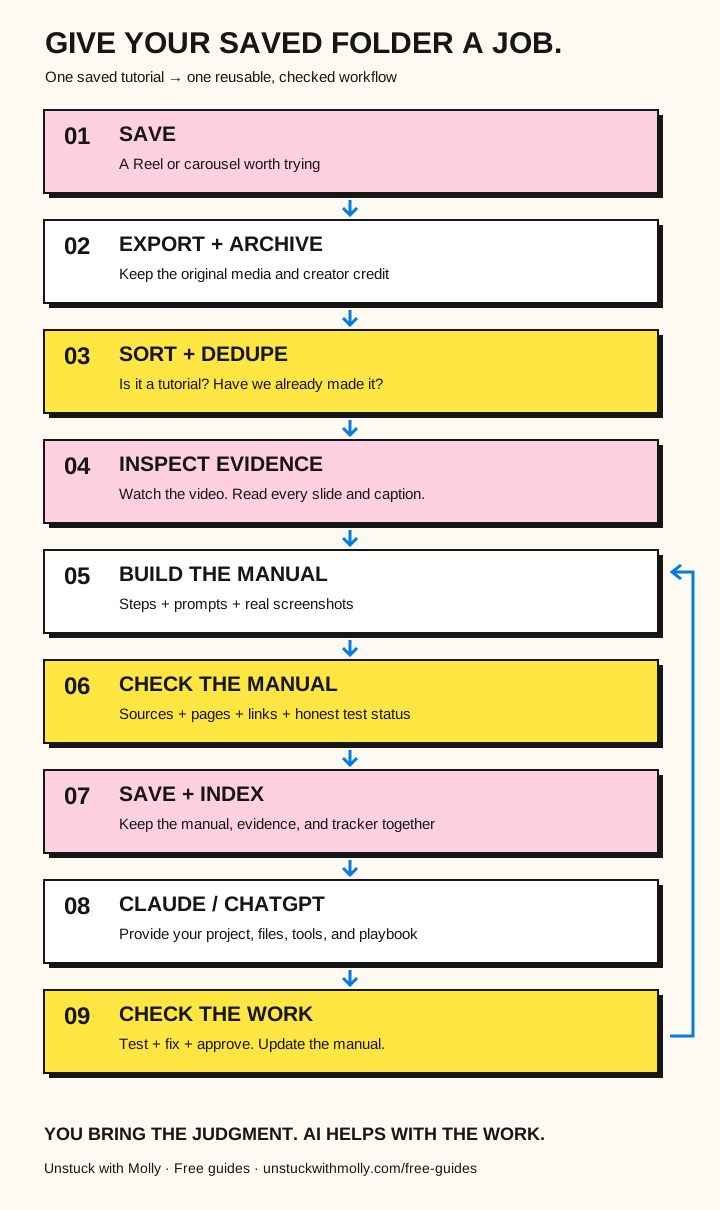
Open the full-size workflow illustration to save it or zoom in.
That last step is important. If the AI follows the manual and discovers that a button has moved, or a prompt doesn’t work, that’s useful information. The manual can be updated.
Now the next person doesn’t have to discover the same problem all over again. That’s how a collection of saved posts starts becoming a library of reusable systems.
10. Start with just THREE posts.
Please don’t start by importing 600 saved posts. I did not build this to encourage another elaborate organizational hobby.
Try the one-post starting path first. Once you have one useful result, use this three-post mini-build to see whether the process repeats.
Start small. Pick three tutorials you’ve saved. Choose ones you actually want to use. Include at least one Reel and one carousel; choose a third tutorial you’ll actually try.
Your first mini-build
- Pick your three posts. Make sure they teach a process, not just an idea.
- Gather the source material. Keep the original link, caption, and media you are authorized to save and use.
- Ask AI to inventory the evidence. What does it actually have? What is missing?
- Generate a manual using my template. Don’t ask for a summary. Ask for instructions someone can follow.
- Review the manual. Check the steps against the original. Check important tool details against official instructions.
- Give it to an AI assistant. Use the implementation prompt from the previous section.
- Inspect what comes back. Did it create the right thing? Is anything missing? Did it make something up?
- Fix the instructions. Save the improved manual for next time.
A concrete example: a one-page onboarding checklist
This is an illustrative project brief, not a claim that this tutorial has been tested.
Suppose you saved a carousel about turning notes into a printable checklist. Your own project is a client onboarding checklist. Supply the actual carousel slides and caption, plus your own onboarding notes. First use Make the manual to document what the carousel actually shows.
After reviewing that manual, fill the implementation prompt like this:
This brief also needs your own notes. The helper below the block can work out those details with you and show a fully supplied example. Keep the eight-item target only if your real notes support eight useful items.
PROJECT:
A one-page onboarding checklist for my own client process.

INPUTS:
- The reviewed manual we just made
- My onboarding notes
- My brand colors and logo, if available

EXPECTED RESULT:
A one-page checklist with a clear title and eight checkboxes,
using only steps supported by my notes. Flag any missing steps.
Create an editable draft. Export a PDF only if your tools support it.

ACCEPTANCE CHECK:
All eight items match my notes. The wording is readable.
The file opens, fits on one page, and has no cut-off text.
Tell me which checks you actually ran.
You should be able to inspect an actual checklist file, or see a clearly named blocked step if the assistant cannot create files. A description of the file it would make is not a finished checklist.
Your first success isn’t 100 manuals. It’s one tutorial you no longer have to keep rewatching. And one useful result you can actually inspect.
11. What I learned building this.
The hard part wasn’t writing.
AI can write a guide in seconds. The hard part was making sure the guide was right.
The source matters more than the prompt.
A fantastic prompt can’t recover instructions that aren’t in the video or caption. Sometimes the right move is to mark a tutorial as incomplete and move on.
A process is more useful than a pile of tips.
A tip might save me five minutes. A good process can help me repeat the same task without starting from scratch every time.
Small batches beat giant AI marathons.
I learned to save progress, check files, and keep a record of what had actually finished. Otherwise, a long-running process can get interrupted halfway through and leave you wondering what happened.
Documentation and execution are different jobs.
I built a process for creating and reviewing manuals, and a separate approach for testing whether the underlying tutorials actually work. I don’t treat an unexecuted tutorial as end-to-end validated.
And the biggest one? The most valuable thing wasn’t the saved Reel. It was the repeatable process I created around it.
Once I had that process, I could use it again. For another creator. Another topic. Another project. And eventually, I could share the process itself. Which is exactly what I’m doing right now.
12. Your next product might be hiding in the process.
You start with one problem. You solve it. Then you realize the annoying little steps you had to figure out are probably annoying for someone else too.
That’s how useful products and systems can start. Not with a genius idea. With a problem you actually solved.
In this case, my problem was a ridiculous collection of saved Instagram tutorials I wasn’t using. So I started building a way to turn them into useful manuals. Then I built tools to help manage the work. Then I realized the process itself was worth sharing.
I wasn’t just collecting information anymore. I was building a way to use it. And that’s the part I want you to steal.
Not my exact spreadsheet. Not my folder names. Not even my prompts.
Steal the idea that when you find yourself doing the same annoying thing over and over, you can turn it into a process. Then let AI help you run that process.
You still bring the judgment. AI helps with the work. And maybe, somewhere along the way, you discover something useful enough to share—or sell.
Your turn
Open your Instagram Saved folder. Find one tutorial you genuinely wish you’d tried. Not the most impressive one. The one that would actually make your life easier.
Get the source material. Make the manual. Check it. Then ask AI to help you do the thing.
Because your Saved folder doesn’t need another inspirational quote. It needs a job.
— Molly, Unstuck with Molly
What’s the tutorial you’ve saved at least three times but still haven’t tried? Tell me by email.